
CWM (Custom Recovery) For CM Flares S3 Octacore (kitkat)

CWM (Custom Recovery) For CM Flares S3 Octacore (kitkat) Requirements:Rootedrashr_tool.apkcmoctacorerecovery.img (rename to recovery.img) Procedure:Step 1:Install rashr_tool.apk Step 2: Move the recovery.img in your SDCARD outside the folder which you can see easily. Step 3: Open Rashr Tools Grant SuperSuClick Recovery from StorageThen choose Recovery.img Click OK Done! Enjoy!

CWM (Custom recovery) For Skk Lynx

Requirements:Rootedrashr_tool.apkrecoverycwm.img (rename to recovery.img) Procedure:Step 1:Install rashr_tool.apk Step 2: Move the recovery.img in your SDCARD outside the folder which you can see easily. Step 3: Open Rashr Tools Grant SuperSuClick Recovery from StorageThen choose Recovery.img Click OK Done! Enjoy! Please give proper credits to me and don’t share it without sharing my blogs! Thank you!
Custom Recovery for Cherry Mobile Me Vibe CWM/TWRP

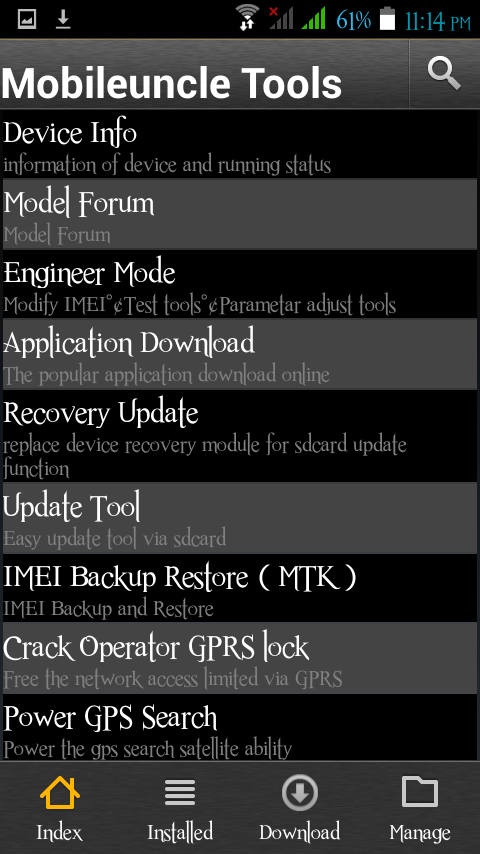
Requirements:Rooted or Proceed for how to root CM Vibe [CLICKHERE]MobileuncletoolsMe_Vibe_CWM.img (CWM)TWRP2.8.2.0_ME_VIBE_recovery.img (TWRP)  for mobileuncle user 1. download Me_Vibe_CWM.img  orTWRP2.8.2.0_ME_VIBE_recovery.img   rename it to recovery.img 2.  move to  sdcard outside of  those folder  3. download Mobileuncletools 4.  open mobile uncle 5. tap recovery update 6. tap recovery.img under “Recovery File in SDCARD” 7.  tap yes or ok ” are you sure to … Read more

Updated CTR 2.7 in Myphone Agua Rain 2G to create backup in CWM

Updated CTR 2.7 in Myphone Agua Rain 2G to create backup in CWM Requirements:Rooted Download Link : Carliv_2.7_v1.22.imgFlash         via         mobile uncle tools. Rename  Carliv_2.7_v1.22.img to recovery.img Procedure:Step 1:Install Mobile Uncle ToolsStep 2: Move the recovery.img in your SDCARD outside the folder which you can see easily.Step 3: Open Mobile Uncle Tools Grant SuperSuClick Recovery … Read more