

How to make full dump recovery.img in Mediatek device
First you need to root your device.

Requirements:
Rooted
Terminal Emulator(download in Playstore)
MTK droid tools
Procedure:
1) Make sure phone has root shell access (rooted) , if you dont have root then please root with IROOT and install superSU+ binaries.
2) Make sure USB debugging is enabled on the smartphone
3) Download MTK droid tools 2.5.3
4) install PDAnet abd driver package
5) run MTK droid tools and open a new ADB SHELL.
1. First check your mountpoints and partitions via this command:
type this command:
adb shell cat /proc/dumchar_info
via ADB COMMAND in Mtkdroidtools
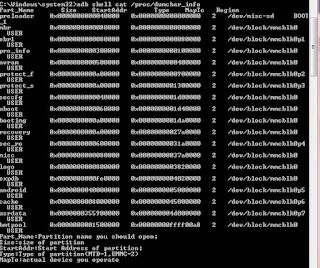
via Terminal Emulator
type this command:
adb shell cat
cat /proc/dumchar_info
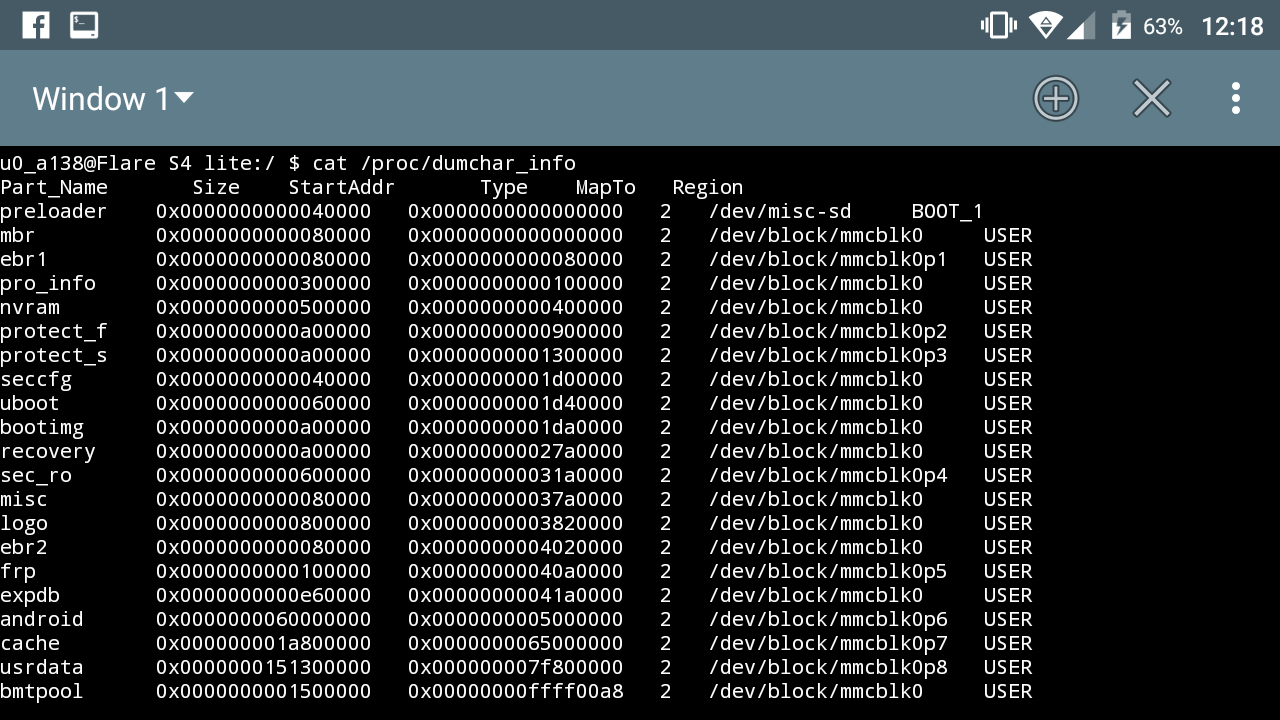
2. Then Check for the mountpoints of Recovery.img
3. Type this command:
adb shell mkdir -p /storage/sdcard0/BACKUP
BACKUP folder must created in your SDCARD.
4. Type this command:
adb shell su -c “dd if=/dev/block/recovery of=/storage/sdcard0/BACKUP/recovery.img”
or
adb shell su -c “dd if=/dev/recovery of=/storage/sdcard0/BACKUP/recovery.img”
You must check your mountpoints usually for new 64 BIT Mediatek device like MT6795 , MT6752 , MT6595 , MT6753 and MT6735
Use this command:
adb shell su -c “dd if=/dev/block/platform/mtk-msdc.0/by-name/recovery of=/storage/sdcard0/BACKUP/recovery.img”
5. Wait to finish! You can now have backup stock recovery.img
Note: This take only few minutes. check the file size usually not more than 15MB.
Credits:
https://androidcrib.com
mtkdroidtools
other not mention